Now Available on Microsoft Store

File Copying,
Reimagined.

The powerful visual interface for RoboCopy. Queue jobs, monitor progress in real-time, parse logs with colour highlighting, and schedule automated transfers with email notifications.

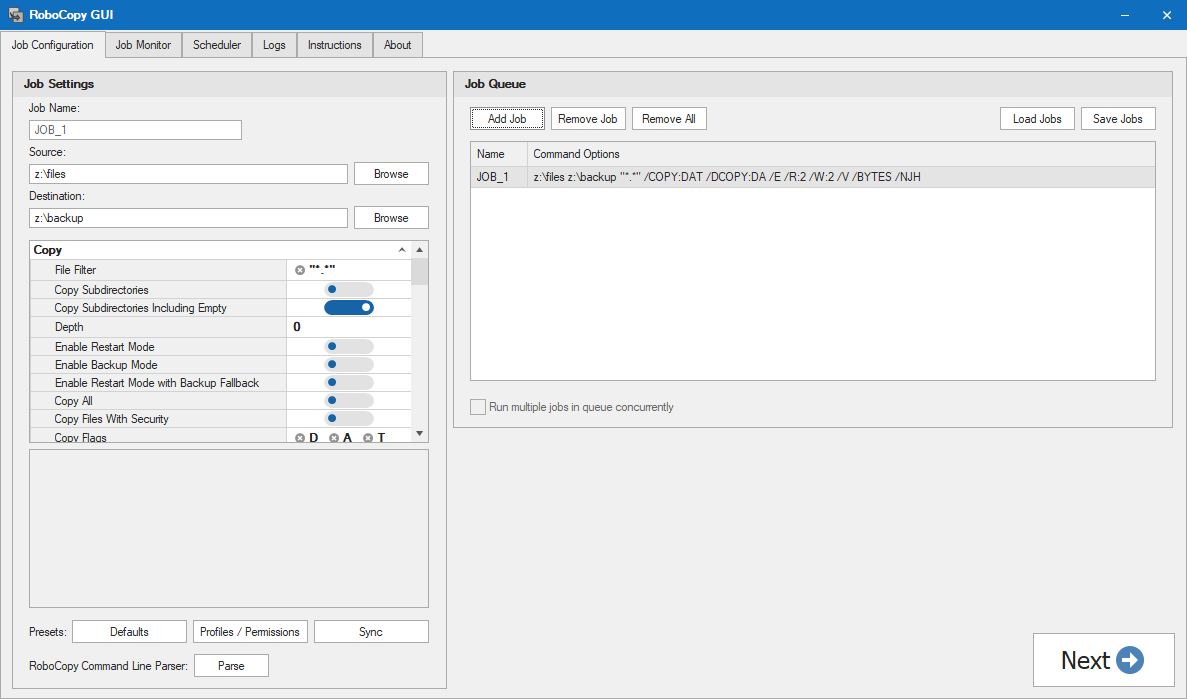
RoboCopy GUI Main Interface
Copy Complete 1,247 files copied successfully

Everything You Need for Reliable File Transfers

RoboCopy GUI transforms the powerful RoboCopy command-line tool into an intuitive visual experience with enterprise-grade capabilities.

📋

Job Queuing

Add multiple RoboCopy jobs to a queue, configure settings or select presets, and run them sequentially or in parallel.

📊

Real-Time Monitoring

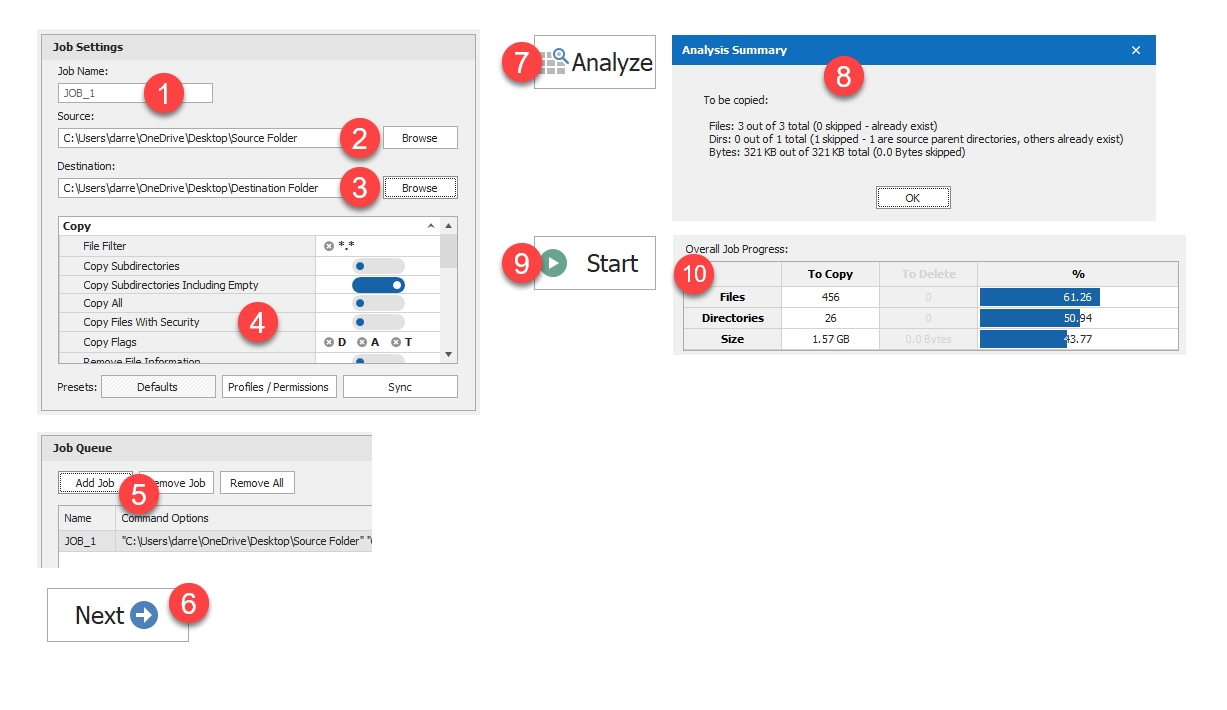
Watch jobs live with the Job Monitor. See file, directory, and byte-level progress as the copy happens.

📜

Smart Log Viewer

View results with colour-coded highlighting to denote actions. Filter and search through logs effortlessly.

🔄

Command Line Parsing

Paste existing RoboCopy command lines to automatically populate your GUI settings and save time.

Job Scheduling

Schedule jobs and receive email notifications with the Portable Business version. Set and forget your backups.

🔍

Pre-Run Analysis

Run a file analysis before copying to see exactly what will be transferred, including file counts and total size.

See It In Action

A clean, modern interface that makes powerful file operations simple and transparent.

RoboCopy GUI Screenshot

Get Started Quickly

A quick walkthrough of configuring and running your first job.

RoboCopy GUI Instructions

Simple, Fair Pricing

Choose the edition that fits your needs.

Standard Edition

Perfect for personal and home use

£4.99
  • Unlimited job queueing
  • Real-time job monitoring
  • Colour-coded log viewer
  • Pre-run file analysis
  • Command line parsing
  • Windows 7–11 support
Get from Microsoft Store

System Requirements

RoboCopy GUI runs on all modern Windows systems.

🖥
OS
Windows 7 / 8 / 10 / 11
or Windows Server 2008R2–2025
🧠
Framework
.NET Framework 4.8+
💾
Disk Space
83 MB
📢
Portable Option
Business Edition
(no install required)

Frequently Asked Questions

Got questions? We've got answers.

If this happens, right-click on the Start Menu icon and choose 'Run as administrator'. RoboCopy GUI requires elevated privileges to function correctly.

No, the whole point of RoboCopy GUI is to show file / directory / byte progress information during the copy, it can't do this without analysing first. If you want to run a job without analysis or progress information being shown, the scheduler available in the Business Portable version allows this.

There is no MT option because the code used internally already utilises multithreading for the copying process, so it is redundant in this instance. Whilst creating the tool I did countless hours of testing with and without enabling the MT switch, and using various MT values and it does not improve the speed when run within RoboCopy GUI because of the internal multithreaded coding used.

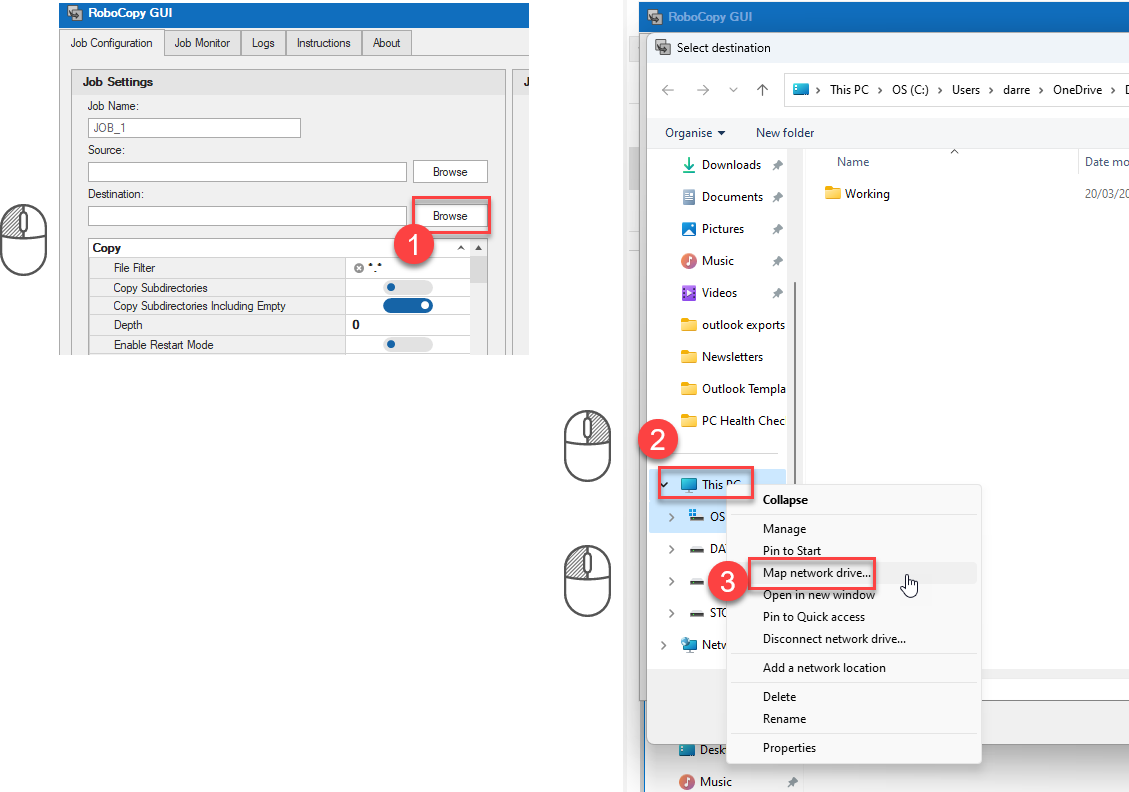
Yes, but you need to ensure the network location is mapped as admin. If not mapped as admin, then it won't be seen / accessible, as RoboCopy GUI runs elevated so mapped drives need to be mapped elevated too.

You can either use a UNC path (recommended) e.g. \\192.168.1.254\usb1, or map the drive from within RoboCopy GUI by right-clicking on This PC and choosing Map Network Drive:

Mapping network drive in RoboCopy GUI

If you are copying from the root of a drive to a destination folder e.g. C:\ to D:\backup then you may find that the D:\backup folder is hidden. This is a known RoboCopy bug. You can either remove the hidden attribute from the folder after completing the copy, or you can set Remove Attributes to S H in the RoboCopy GUI interface to fix the issue automatically.

Log files are located in: C:\ProgramData\PC Assist Software\RoboCopyGUI\Logs

When configuring Scheduled Tasks ensure you use an account with adequate permissions for the job to run correctly.

If source / destination located on the same computer then use an account which is a local administrator of the machine, and ensure account doesn't have a blank password.

If copying across a network / domain from one computer or server to another then use an account with domain administrator rights.

Once job has been added to Windows Task Scheduler you can further edit the schedule if you have requirements such as running multiple times each day or every hour etc.

N.B. If using email notifications note fair usage policies apply so avoid sending emails multiple times each day.

"An error occurred while parsing EntityName. Line xx, position xx" when clicking Load Jobs

Check your XML file on the line specified in the error message. Common causes of problems are if you have edited this file manually and your Source or Destination path contains an invalid character e.g. an ampersand (&) symbol – if so it should appear as & not & e.g. "me & you" not "me & you". If you create the paths within RoboCopy GUI and click Save Jobs then this problem shouldn't occur. Only manually edit this file if you understand XML syntax rules.

"The 'xxx' start tag on line x position x does not match the end tag of 'xxx'. Line x, position x." when clicking Load Jobs

The usual cause of errors such as this are if you have attempted to edit the XML file manually rather than creating it using RoboCopy GUI and means you have missed an opening (<) or closing (>) XML tag. e.g. "Recent/Item>" which should actually be "Recent". Only manually edit this file if you understand XML syntax rules.

Release Notes

A complete history of RoboCopy GUI releases and improvements.

Date Version Details
10/05/23 v2.0 Initial public release
20/05/23 v2.1 Added instructions and improved error reporting
03/06/23 v2.2 Fixed error with log location
04/07/23 v2.3 Bug fixes
09/10/23 v2.4 Core components updated
Bug fixes
Error handling improvements
13/10/23 v2.5 Error reporting fixes
21/10/23 v2.6 Save / Load Job feature added so you can save all jobs in queue to XML and quickly load them again
Core components updated
Fixed issue with Logs not being sorted correctly in Date/Time order
Exclude Files, Exclude Directories and File Filter now correctly validates entry for allowed values
Various other bug fixes
25/10/23 v2.7 Core components updated
Destination path validation logic improved
Bug fixes
26/10/23 v2.7.1 Fixed "Illegal characters in path" error in Destination path entry
Resolved issue where ExcludeFiles, ExcludeDirectories and FileFilter would not accept values containing spaces
05/12/23 v2.7.2 Fixed "Invalid RASHCNETO string!" error when using Include / Exclude Attributes
Improved error logging
27/12/23 v2.7.3 Rate and Review button added to About tab
05/01/24 v2.7.4 Bug fixes
15/02/24 v2.7.5 Improved folder browser dialog added for easier selection of network locations and mapping drives whilst elevated
Core components updated
Bug fixes
16/02/24 v2.7.6 Fixed speed statistics shown in results and logs
29/02/24 v2.8 New feature - can now parse existing RoboCopy command lines to populate your GUI settings
Now plays a sound and restores minimized window when job complete
Destination disk space issue resolved
Fixed issue with Minimum / Maximum Last Access Date switches not working correctly
Core components updated
Various miscellaneous bug fixes and code improvements
05/03/24 v2.8.1 Improvements made to error reporting and handling
Multiple jobs in queue can now be run concurrently if required
13/03/24 v2.8.2 Fixed multiple job checkbox not enabling when loading saved jobs from file
Added Include Modified (/IM) switch
Core components updated
14/03/24 v2.8.3 Bug fix
20/03/24 v2.9 Major improvements to memory usage to resolve 'System.OutOfMemoryException' errors on large jobs
Core components updated
19/04/24 v3.0 Core components updated
New feature - Ability to schedule jobs to run at specific times/days (Portable Business version only)
Email notifications (Portable Business version only)
26/05/24 v3.1 Core components updated
Parsing of UNC paths fixed
Multiple fixes and improvements made to job scheduler
26/07/24 v3.1.1 Core components updated
Fixed issue where : not an allowed character for file / folder exclusions
23/08/24 v3.2 Core components updated
Various improvements and fixes relating to email notifications
N.B. This release applies to Portable Business version only
09/11/24 v3.2.1 Core components updated
More error information added for issues when using Load Jobs - including new Common Errors section below
15/11/24 v3.2.2 Core components updated
Fixed issue with email notifications and log attachment
N.B. This release applies to Portable Business version only
02/12/24 v3.3 Added ability to edit existing scheduled tasks allowing you to change command line and email address
N.B. This release applies to Portable Business version only
26/12/24 v3.3.1 Core components updated
Log file attachment size check added to email alerts
Resolved FileFilter issue where it was changing filter in existing jobs when adding new job to queue
29/01/25 v3.3.2 Fix MSIX elevation capability failures on Windows 11 24H2 and later
01/04/25 v3.3.3 Selected job in queue now populates property grid
Various bug fixes
01/06/25 v3.4 New improved log viewer with highlighting and filtering
Bug fixes
Core component updates
19/08/25 v3.5 Internal code optimizations and fixes
Core component updates
25/09/25 v3.6 Fix for Google Drive destinations
03/12/25 v3.7 Core component updates
Code optimizations
05/01/26 v3.8 Core component updates
Writable CD and DVD media now supported as destinations
13/01/26 v3.9 Added ability to copy selected Job in Queue settings to Scheduler (Portable Business version only)
Code optimization
UI tweaks
Command line parsing bug fixes
29/01/26 v3.9.1 DPI support enabled for high resolution displays
Log file now zipped before sending via email to allow larger log files (Portable Business version only)
02/02/26 v3.9.2 Various tweaks and fixes related to display scaling / DPI support
16/02/26 v3.9.3 Added missing flags to COPY and DCOPY
20/05/26 v3.9.4 Fixed issue with DPI support
Zipped log file attached for email alerts now optional (Portable Business version only)
Job name added to email alert subject and log file name for scheduled jobs (Portable Business version only)
Various tweaks and bug fixes
04/07/26 v3.9.5 Miscellaneous bug fixes and tweaks
N.B. This release applies to Portable Business version only

Ready to Simplify Your File Transfers?

Join thousands of users who trust RoboCopy GUI for reliable, transparent file copying on Windows.

Explore Other Apps

Check out my other software products and utilities on the PC Assist Software website.

📄
PDF Assist
PDF editing and conversion
💾
Backup Assist
Backup and restore
💼
Essential Office
Office productivity tools
Visit PC Assist Software